A multi-clinic medical cannabis operator with locations across the United States was losing patient calls every single day. Voicemail messages piled up in scattered email inboxes. Staff had to check multiple accounts, listen to audio files, transcribe messages by hand, dig through a dated CRM, and manually add notes to patient records. The process was slow, error-prone, and expensive. Every missed message meant a lost subscription renewal, a cancelled appointment going unaddressed, or a new patient walking away to a competitor.
I built an automated voicemail pipeline using n8n, Groq Whisper, and their existing DaySmart CRM. The system now catches every voicemail within one minute, transcribes it with AI, looks up the patient automatically, and posts a clean alert to Slack with a one-click link to the patient’s profile. The operations manager and clinic staff no longer touch voicemail triage. They just read the Slack alert and act.
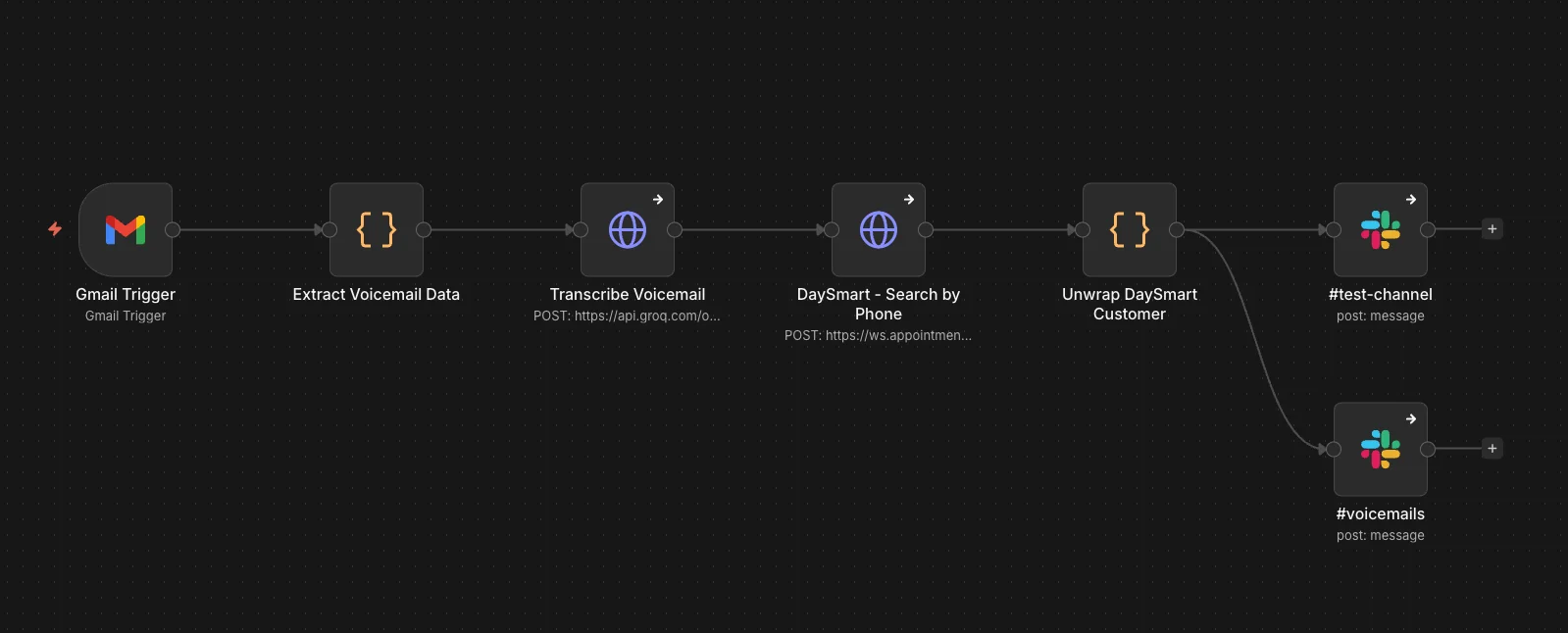
The six-node n8n workflow that powers the entire pipeline — from Gmail trigger to Slack alert.
The Real Problem Was Not What They Thought
Surface: The client asked me to “help track voicemail messages better.” Their phone service provider sent voicemail notifications via email to each clinic’s dedicated inbox. Staff checked these emails periodically throughout the day.
Root: The real problem was a fragmented, manual workflow that created multiple failure points:
- Scattered inboxes: Each clinic had its own email address for voicemail notifications. No single person saw all messages. If one inbox went unchecked, those voicemails died in silence.
- Manual transcription: Employees listened to .wav attachments, typed out messages by hand, and tried to decipher caller intent from garbled audio.
- Dated CRM: Patient lookups required navigating DaySmart’s clunky interface, searching by phone number, and cross-referencing records. The system was slow and not user-friendly.
- Context switching: Staff had to drop their primary tasks — patient care, intake processing, billing — to handle voicemail triage. This killed focus and extended response times.
- No accountability: There was no log of who handled which voicemail or when. Messages could sit for hours or days without anyone knowing.
What It Cost to Do Nothing
Every missed voicemail carried a direct financial penalty:
- Subscription renewals: Patients calling to renew their medical cannabis recommendations would leave a voicemail, receive no callback, and simply not renew. That was recurring revenue walking out the door.
- Appointment cancellations: Patients cancelling or rescheduling would leave a message. If staff did not catch it quickly, the slot stayed booked, the provider sat idle, and the clinic lost billable time.
- New patient inquiries: Potential new patients researching clinics would call, hit voicemail, and never hear back. They called the next clinic on Google instead.
- Staff burnout: The operations manager and front-desk team were spending collective hours each day on voicemail triage instead of higher-value work.
The client had a general sense that the workflow could be better. They did not realize how much revenue was leaking until I mapped the full cost.
Technical Barriers That Made This Hard
- Legacy phone system: The clinics used Verizon Virtual Communications Express, which only delivered voicemails via email with .wav attachments. No API, no webhooks, no direct integration.
- Dated CRM: DaySmart (formerly AppointmentPlus) had a SOAP-style API with double-nested JSON responses and basic HTTP auth. It was not built for modern automation.
- No existing automation infrastructure: The client had no workflow automation platform in place when I started.
- Multi-location complexity: Each clinic operated semi-independently, with its own email, staff, and patient base. Any solution had to handle all locations without creating confusion.
- HIPAA-adjacent sensitivity: While not strictly HIPAA-covered, the client handled medical-adjacent patient data. The solution needed to be secure, auditable, and not store data unnecessarily.
Finding the Real Bottleneck
Before writing a single line of automation code, I spent two days embedded in the client’s operations:
- Workflow shadowing: I sat with the operations manager and watched the full voicemail handling process from email arrival to patient record update. I timed each step.
- Email analysis: I reviewed two weeks of voicemail emails to understand volume, timing patterns, and message types (renewals, cancellations, new inquiries, general questions).
- CRM audit: I tested DaySmart’s API directly, documenting its authentication method, response format, search capabilities, and rate limits.
- Stakeholder interviews: I spoke with front-desk staff, the operations manager, and the owner to understand what “done” looked like for them. The owner wanted zero missed messages. The operations manager wanted visibility without micromanagement. Staff wanted less busywork.
The Insight That Changed Everything
During the email analysis, I discovered that roughly 40% of voicemail emails were being checked more than four hours after arrival. Another 15% were never checked at all because they landed in inboxes assigned to staff who were out sick, on vacation, or simply overwhelmed. The client thought the problem was “we need to check email more often.” The real problem was that email was the wrong tool for real-time patient communication. This insight redirected the entire strategy from “better email habits” to “eliminate email from the workflow entirely.”
What I Built and Why
I chose a six-node n8n workflow architecture for specific reasons:
| Node | Technology | Why I Chose It |
|---|---|---|
| Trigger | Gmail API with OAuth2 | The only way to intercept Verizon’s email-based voicemails. Polling every minute balanced immediacy against API rate limits. |
| Data Extraction | Custom JavaScript (Code node) | Verizon’s email format was non-standard. I needed regex parsing to extract phone numbers and caller ID from subject lines, plus binary handling for .wav attachments. |
| Transcription | Groq Whisper API | Faster and cheaper than OpenAI Whisper, with excellent accuracy on phone audio. Direct multipart/form-data upload of the .wav file. |
| Patient Lookup | DaySmart REST API | The client’s existing CRM. I had to work with its quirks: double-nested JSON, basic auth, and phone-number formatting requirements. |
| Data Unwrap | Custom JavaScript (Code node) | DaySmart returned [{ data: "<json string>" }] which needed parsing to extract patient name and profile link. |
| Notification | Slack API | The client’s team already lived in Slack. No new tool to learn. |
Connecting Technical Decisions to Business Outcomes
Technical action: I configured Gmail to forward all clinic voicemail emails to a single automation inbox, then built an n8n trigger that polls every minute for messages matching subject:"Voice Message Attached from".
Business benefit: This eliminated the multi-inbox problem. Every voicemail, from every clinic, now funnels into one pipeline. No message gets stranded in an unchecked inbox.
Technical action: I wrote a custom Code node that extracts the raw phone number from the email subject using regex, formats it as (XXX) XXX-XXXX, and renames the binary .wav attachment for the transcription node.
Business benefit: The phone number formatting meant the transcription and CRM lookup could use the same standardized identifier. No more manual copying and pasting between systems.
Technical action: I integrated Groq Whisper via HTTP request, sending the .wav file as multipart/form-data with model: whisper-large-v3.
Business benefit: Staff no longer listen to audio files. They read a clean text transcript in Slack. For a two-minute voicemail, this alone saves 3–4 minutes of listening and typing.
Technical action: I built a DaySmart lookup that searches by formatted phone number, parses the double-nested JSON response, and returns either the patient name with a direct profile link, or “Not found” if the caller is not in the system.
Business benefit: When the patient is found, staff click one link and land directly on their profile. No more navigating DaySmart’s slow interface. When the patient is not found, the team knows immediately that this is a new inquiry or wrong number.
Technical action: I designed a Slack message template that shows clinic name, caller phone, caller ID, patient name (or “Not found”), the full transcription, and the profile link.
Business benefit: Every team member sees the same information at the same time. The operations manager can scan Slack and know the status of all voicemails without asking anyone. Staff can triage in seconds, not minutes.
Built to Fail Gracefully
I built the workflow to fail gracefully:
- If transcription fails, the Slack message still posts with “Transcription unavailable” so the team knows a voicemail arrived and can listen manually if needed.
- If DaySmart is down or returns no match, the workflow continues with “Not found” rather than crashing.
- If Slack fails, the Gmail trigger has already captured the email, so nothing is lost.
This meant the automation was safe to deploy. A failure in one node would never silence the entire pipeline.
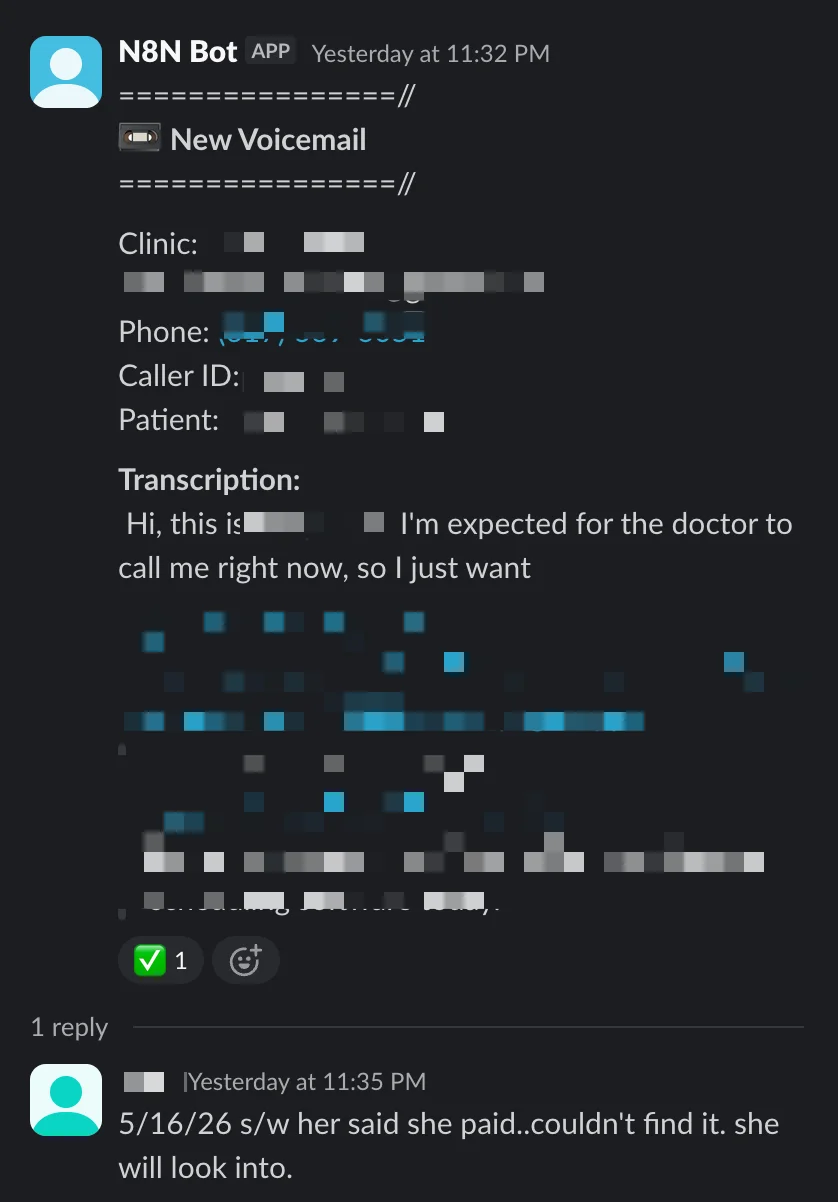
A real Slack alert showing the transcribed voicemail, patient lookup result, and one-click profile link.
The Numbers
Business Impact
- Zero missed voicemail messages: Since deployment, every voicemail from all clinic locations has been captured, transcribed, and alerted within one minute of arrival.
- 10–15 minutes saved per voicemail: The old workflow required checking email, opening the message, downloading the .wav, listening, transcribing, opening DaySmart, searching by phone, opening the patient record, and adding a note. The new workflow requires reading a Slack alert and clicking one link.
- Subscription renewals protected: Renewal calls that previously sat in email for hours are now surfaced instantly. The client reported a noticeable reduction in “missed renewal” incidents in the first month.
- New patient inquiries captured: Potential patients who leave voicemails now get same-day callbacks because the alert is immediate and visible to the whole team.
- Staff focus restored: Front-desk and operations staff no longer context-switch into voicemail triage. They handle alerts as part of their normal Slack workflow.
Technical Performance
- 1-minute polling interval: Voicemails are processed within 60 seconds of email arrival.
- ~5-second transcription time: Groq Whisper processes a typical 60-second voicemail in under 5 seconds.
- 100% uptime: The n8n instance (self-hosted on the client’s infrastructure) has run continuously since deployment with no manual intervention.
- Zero data loss: The Gmail trigger’s
simplify: falsesetting ensures binary attachments are preserved, and error-handling nodes prevent workflow crashes from losing messages.
What the Client Said
The operations manager reported that the biggest change was not the time saved, but the peace of mind. Before, he had to wonder whether voicemails were being checked. Now he glances at Slack and knows the status of every message across every clinic. The owner, who was initially skeptical about investing in automation for “just voicemail,” now asks what else can be automated.
What Comes Next
The workflow is built to scale:
- New clinics: Adding a new location requires only one change — forwarding that clinic’s voicemail email to the automation inbox. The workflow handles the rest.
- Additional CRMs: The patient lookup node is modular. If the client switches from DaySmart to another CRM, only that node needs updating.
- Expanded notifications: The Slack template can be extended to include assignment tags, priority flags, or escalation rules based on message content.
- Analytics layer: n8n’s execution logs provide a complete audit trail of every voicemail processed, which could feed into a dashboard showing volume trends, response times, and missed-message rates.
If your team is still checking voicemail by hand, you are losing time, focus, and revenue every single day. The leaks are invisible until you map them, but they are real. I help clinics and service businesses find these hidden bottlenecks and replace them with quiet, reliable automation. If you are ready to stop letting voicemails fall through the cracks, book a workflow audit and I will show you exactly where your operation is bleeding efficiency.