B2B Payment Reconciliation Automation: 80% Reduction in Daily Manual Work
A mid-sized Australian B2B industrial supplier processes hundreds of payments every week. Some come through a credit card gateway. Others arrive as EFT transfers shown on Commonwealth Bank Commbiz statements. Every one of those payments needs to be matched to an invoice or sales order in NetSuite and turned into the correct customer payment or deposit record.
Before I built this system, the finance team was doing that by hand. Each morning, someone downloaded settlement reports, opened the bank statement CSV, searched NetSuite for customer names and document numbers, and created records one by one. The work was slow, repetitive, and easy to get wrong. A single missed payment or duplicate entry could take hours to untangle at month end.
I built an automation system in n8n that handles the entire reconciliation pipeline. It fetches credit card settlements, matches them to NetSuite using six different strategies, creates the correct payment or deposit records, and uploads a complete audit report to SharePoint. For bank transfers, a separate workflow reads a CSV, extracts company names from messy statement descriptions, and applies the same matching logic. A final human-in-the-loop workflow lets the finance team approve matched rows before any records are created, with a dry-run mode for safe testing.
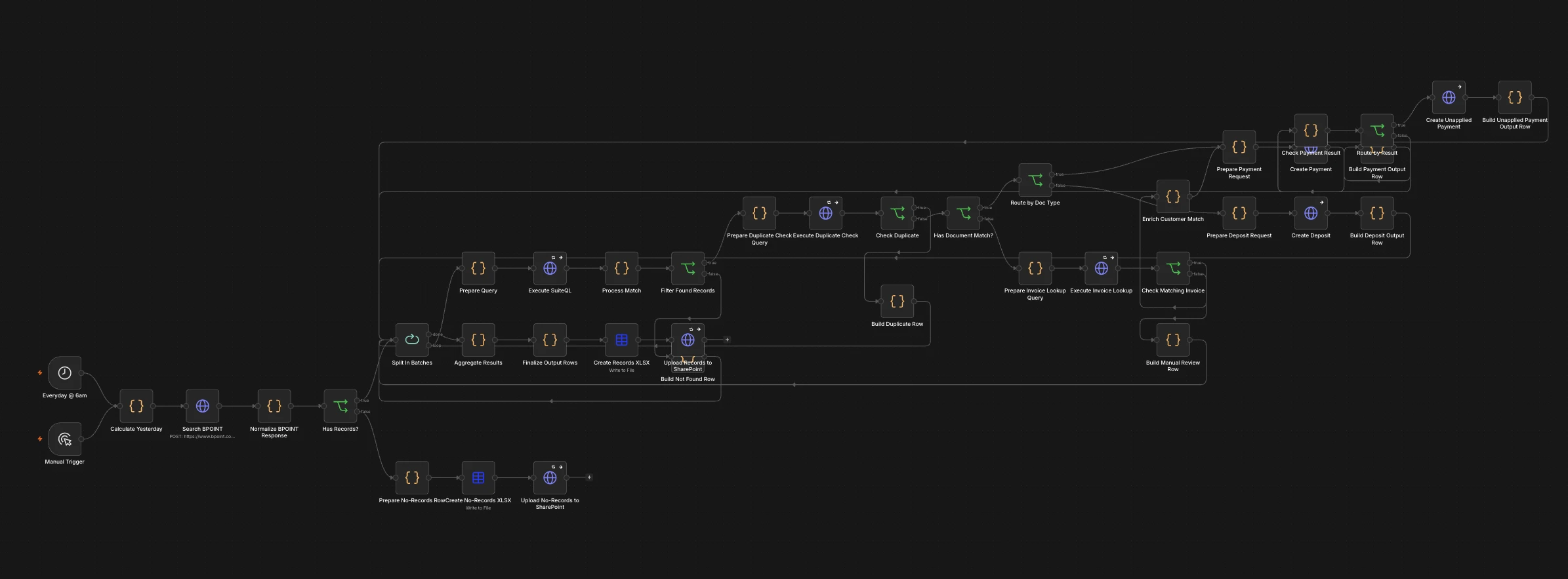
The main automated payment allocation workflow — fetching BPOINT settlements, matching them to NetSuite records, and uploading an audit report to SharePoint.
The Real Problem Was Not What They Thought
The surface issue was clear: reconciliation was taking too long. The deeper problem was that the workflow forced the finance team to act as the glue between three systems that should have been talking to each other.
- Manual cross-referencing: Every payment had to be matched against NetSuite invoices and sales orders by hand. Some customers included an invoice number in the reference. Others wrote only their company name. Some wrote nothing useful at all. The team had to guess, search, and verify each one.
- No single source of truth: Payment data lived in BPOINT and Commbiz. Customer records and open documents lived in NetSuite. The matching decisions lived in spreadsheets and email threads. There was no central place to see what had been allocated and what was still outstanding.
- Error-prone record creation: Customer payments and deposits in NetSuite had to be created individually. A wrong amount, a wrong customer, or an accidental duplicate would throw off the books.
- Slow month-end close: Because daily work was manual, errors and exceptions piled up. By month end, the team was spending days chasing discrepancies that should have been caught the same morning.
- No audit trail: There was no automatic record of which payment had been matched to which document, or why a particular decision had been made. When something looked wrong later, the team had to reconstruct the logic from memory.
What It Cost to Do Nothing
The daily cost was not just time. It was the accumulated risk of doing high-volume financial work manually.
- Missed or delayed payments: If a payment was not matched the same day, the customer might appear overdue, triggering unnecessary follow-up calls and damaging relationships.
- Duplicate postings: Without a deduplication mechanism, the same payment could be entered twice if the same settlement report was processed again.
- Context-switching overhead: The finance officer had to move between BPOINT, Commbiz, NetSuite, and Excel repeatedly. Every switch introduced friction and the chance of copying the wrong value into the wrong field.
- Month-end bottlenecks: Daily exceptions that were not resolved immediately became weekly and monthly problems. The close process took longer than it should have.
- Opportunity cost: A finance officer spending 2–4 hours per day on reconciliation could have been doing analysis, cash flow forecasting, or vendor management instead.
At an estimated loaded hourly cost of AUD $35–$42 per hour for a finance officer in Australia, 2–4 hours per day translates to roughly AUD $25,000–$50,000 per year in labor cost alone. That does not include the cost of errors, rework, or delayed decision-making.
Finding the Real Bottleneck
Before writing any code, I mapped the full reconciliation process from the moment a payment arrived to the moment the NetSuite record was created.
- Payment source audit: I identified every payment channel: BPOINT credit card settlements, Commbiz EFT exports, and occasional manual transfers.
- NetSuite data model review: I documented the relevant record types —
invoice,salesorder,customerpayment, andcustomerdeposit— and the fields available for matching. - Reference analysis: I reviewed a sample of BPOINT reference fields and Commbiz statement descriptions to see what information customers actually provided. Some included
SO12345orINV12345. Others included only company names. Many had noise like “PTY LTD”, “THE”, “PUMP”, or truncated names. - Stakeholder interviews: I spoke with the finance officer and the operations manager. The finance officer wanted accuracy and less repetition. The operations manager wanted visibility and a clean month-end close.
The Insight That Changed Everything
The matching problem was not one problem. It was six different problems, each requiring a different matching strategy. Some customers gave a sales order number. Some gave an invoice number. Some gave a reference number that lived in NetSuite’s otherrefnum field. Some gave only a company name, often with typos or abbreviations. And some gave nothing useful at all.
The answer was not to pick one matching rule. It was to build a ranked, multi-strategy matcher that tries the most reliable signals first, falls back to weaker ones, and surfaces the rest for human review. Once I framed the problem that way, the whole system design became clear: fetch, match, deduplicate, create, report, and notify.
What I Built and Why
Workflow 1: Automated BPOINT Payment Allocation
This is the core of the system. Every morning at 6am AEST, it runs automatically and can also be triggered manually.
It performs the following steps:
- Fetch BPOINT settlements: Calculates yesterday’s date in
Australia/Sydneytime, then calls the BPOINT transaction search API for all settled credit card transactions. - Normalize the response: Filters out excluded biller codes and transactions that are not approved. Converts amounts from cents to dollars.
- Batch process each transaction: Uses a
Split In Batchesloop to handle each transaction individually. - Match to NetSuite: Runs a dynamic
UNION ALLSuiteQL query that tries six strategies in priority order:- Sales order number (
SO12345) - Estimate linked to a sales order
- Invoice number (
INV12345) - Sales order by other reference number
- Invoice by other reference number
- Fuzzy customer name match with noise-word filtering
- Sales order number (
- Rank results: Scores matches by strategy priority and word overlap, then selects the best match.
- Detect duplicates: Searches existing
customerpaymentandcustomerdepositrecords for a memo containingBPOINT TXN<txnNumber>. If found, the transaction is markedduplicateand skipped. This makes the workflow idempotent. - Create NetSuite records: For invoices, creates a customer payment. For sales orders, creates a customer deposit. If auto-apply fails due to line-item mismatch, it falls back to an unapplied payment.
- Upload audit report: Aggregates all results, creates an XLSX file, and uploads it to SharePoint with a timestamped filename.
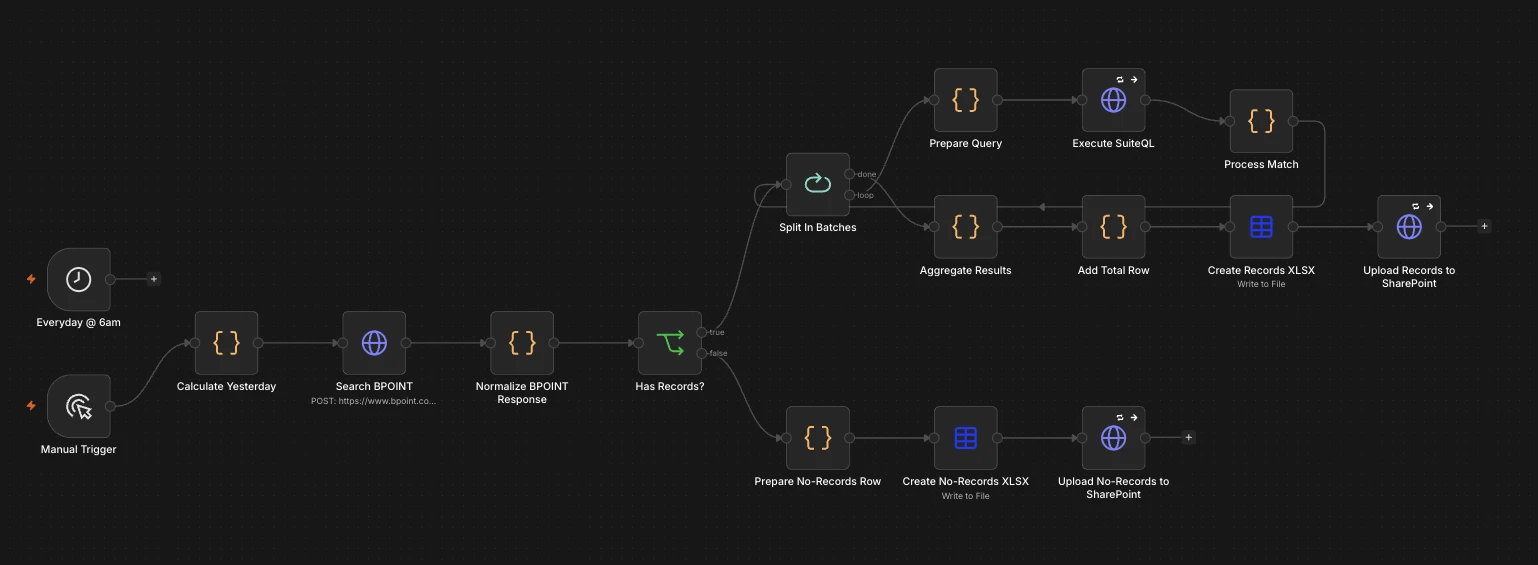
The human-in-the-loop review workflow generates a matching report for the finance team before any NetSuite records are created.
Workflow 2: BPOINT Human-in-the-Loop Review
A lighter workflow that produces the same matching report but stops short of creating NetSuite records. It is useful when the finance team wants to review the proposed matches before committing them, or when the full auto-allocation workflow is being tested.
It follows the same fetch, normalize, and match logic, then uploads a spreadsheet to SharePoint for review. This gave the team a safe way to validate the matching accuracy before turning on the fully automated path.
Workflow 3: Commbiz Bank Statement Matching
EFT payments do not arrive through BPOINT. They show up as lines in a Commbiz CSV export. I built a separate workflow triggered by a form upload.
The workflow:
- Parses the uploaded CSV and filters out excluded lines such as bank fees and internal transfers.
- Extracts company names from free-text statement descriptions, stripping banking prefixes and noise words like “PTY LTD”, “THE”, “AND”, “PUMP”, and “SERVICES”.
- Runs a multi-strategy SuiteQL search using direct identifiers, reference numbers, keyword matches, and amount-based tolerance matching.
- Ranks matches by identifier strength, name overlap, amount proximity, and transaction recency.
- Uploads a 12-column spreadsheet to SharePoint with matched and unmatched rows.
This handles the roughly 80% of bank transfers that can be matched automatically, leaving only the exceptions for manual review.
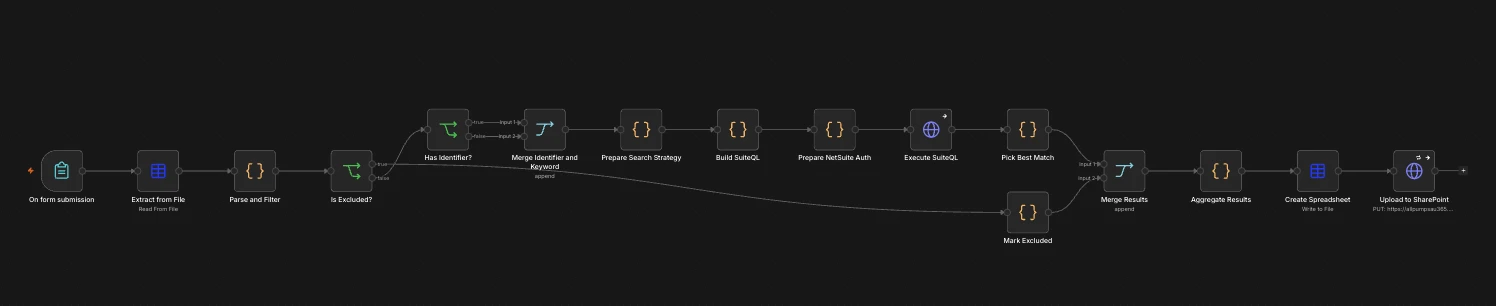
The Commbiz bank statement matching workflow extracts company names from messy CSV descriptions and matches them to NetSuite invoices and sales orders.
Workflow 4: Approved Payment Posting (Human-in-the-Loop)
Once the finance team has reviewed the spreadsheet and marked rows as approved, they upload a CSV to a password-protected form. A workflow then creates the actual NetSuite records.
Key safety features:
- Dry-run mode: The form includes a dry-run checkbox. When enabled, the workflow runs the full logic but returns mock record IDs instead of creating real NetSuite records. Manual executions from the n8n editor are always forced to dry-run.
- Continue on error: If one row fails to create, the rest of the batch continues.
- Teams notifications: A summary of total, successful, and failed rows is posted to the finance team’s Microsoft Teams channel.
- Smart CSV parsing: Handles Excel BOM characters, inconsistent whitespace, and multiple possible status column names.
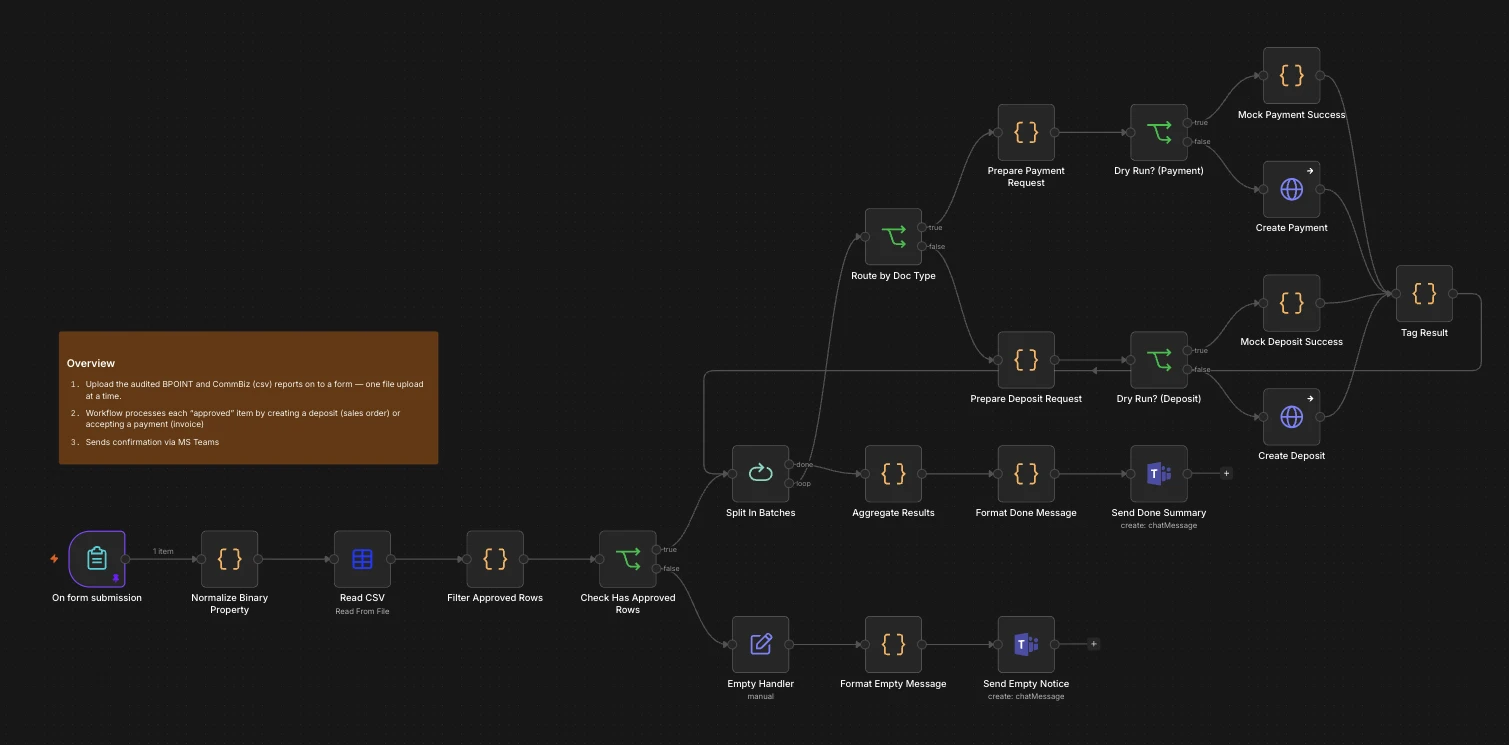
The human-in-the-loop posting workflow creates NetSuite records only for approved rows, with a dry-run safety gate and Microsoft Teams summary.
Key Design Decisions
1. Multi-Strategy Matching
No single matching rule would work because customer references vary so much. The six-strategy approach, ranked by reliability, lets the system handle most cases automatically while flagging the genuinely ambiguous ones for the finance team.
2. Memo-Based Fingerprinting for Idempotency
Every NetSuite record created by the system includes BPOINT TXN<txnNumber> in the memo field. The duplicate check searches both customerpayment and customerdeposit for this string. If the workflow is re-run, triggered manually, or the schedule fires twice, already-processed transactions are skipped automatically.
3. Auto-Apply with Graceful Degradation
NetSuite’s payment auto-apply can fail when invoice line items do not align perfectly with the payment. Rather than letting this become a hard failure, the workflow detects the specific line-item-mismatch error and retries with autoApply: false, creating an unapplied payment on the customer’s account. This converts a blocking error into a minor manual task.
4. Human-in-the-Loop for Safety
The full automation is powerful, but the finance team still has control. The review workflow lets them inspect proposed matches before posting. The approved-posting workflow requires an explicit upload and supports dry-run testing. This balance of automation and oversight is what made the system safe to deploy.
5. Configuration via n8n Variables
All NetSuite configuration — GL account IDs, currency, payment method, exchange rate — is stored in n8n variables rather than hardcoded into Code nodes. This lets finance administrators update settings without changing workflow logic.
6. Comprehensive Audit Trail
Every run produces a timestamped XLSX report on SharePoint showing the original reference, the matched customer and document, the NetSuite record link, the outcome status, and any error messages. The team can see exactly what happened without logging into n8n.
The Numbers
Business Impact
- Estimated 2–4 hours of manual reconciliation work saved per day: Before the automation, the finance team spent time every morning downloading reports, searching NetSuite, and creating records one by one. The automated workflow handles the bulk of this work before the team arrives.
- Estimated annual labor cost savings: AUD $25,000–$50,000: Based on a loaded hourly cost of AUD $35–$42 per hour for a finance officer in Australia, 2–4 hours saved per working day translates to roughly that range. The actual figure depends on the team member’s salary, overhead, and how much of the freed time is redirected to higher-value work.
- Faster reconciliation cycle: Credit card payments are now matched and posted automatically by 6:30am AEST. The day’s payments are reconciled before the finance team starts work.
- Reduced error risk: Deduplication and structured matching reduce the chance of double-posting or allocating a payment to the wrong customer.
- Cleaner month-end close: Because daily exceptions are surfaced immediately in the audit report, they do not accumulate into month-end bottlenecks.
- Better team visibility: Microsoft Teams notifications mean the finance team knows the status of every run without checking the n8n dashboard.
Technical Performance
- Daily schedule: Runs automatically at 6am AEST, with an optional manual trigger.
- 40-node core workflow: Orchestrates BPOINT API, NetSuite SuiteQL, NetSuite REST Record API, and SharePoint via Microsoft Graph API.
- OAuth 1.0a HMAC-SHA256 signing: Implemented in Node.js Code nodes for NetSuite authentication — no third-party OAuth libraries required.
- Six matching strategies: Sales order number, estimate-linked sales order, invoice number, other reference number matching, and fuzzy customer-name matching with noise filtering.
- Idempotent processing: Memo-based fingerprinting prevents duplicate payments even if the workflow is re-run against the same date.
- Human-in-the-loop safety: Review workflow and approved-posting workflow with dry-run mode and Microsoft Teams notifications.
- Bank statement support: Commbiz CSV parsing with company-name extraction and amount-tolerance matching.
What Comes Next
The system is in production and running daily, but there are natural extensions:
- Additional payment sources: If the business adds another payment gateway or bank feed, the same matching and posting pipeline can be reused.
- Exception dashboard: A lightweight dashboard showing unmatched transactions, duplicate flags, and unapplied payments could reduce the need to open SharePoint spreadsheets.
- Predictive matching: Machine learning could improve the fuzzy customer-name matcher over time by learning from previous manual corrections.
- Multi-currency handling: If the business expands payment currencies, the existing exchange-rate variable can be extended into a per-currency lookup.
- Sales rep notifications: The audit report already includes sales rep names. Automated notifications to reps when their customers pay could improve follow-up timing.
If your finance team is still reconciling payments by hand across multiple systems, you are likely losing hours every day to work that should be automated. The cost is not just the salary spent on repetitive tasks — it is the risk of errors, delayed reporting, and finance staff who never get to the analysis work that actually moves the business forward. I help B2B companies build automation systems that connect payment gateways, ERPs, and reporting tools using n8n, NetSuite, and custom code. Book a workflow audit and I will show you exactly where your reconciliation process is bleeding time and money.